★ Lap Timer · 3D Replay · Phone & Desktop

Any hardware.
One analysis.

iPhone, Android, RaceBox, RaceChrono CSV — LapVision opens any log. Watch your lap in 3D right at the paddock on your phone, dive deep on the desktop at home.

iPhone Android Desktop PC
0+
tracks in database
0 OBD2
Pro parameters
0
platforms — phone & pc
0
ads / subscriptions
scroll to explore
Always knowing where you stand.

Real-time lap time, delta vs your best, speed, G-force, satellites and device battery — one glance and back to the wheel.

Sokol · Big track
LAP 7
REC · LIVE
1:30.987
−0.234
vs best lap
Speed
142km/h
Lat G
0.84G
Satellites
12SAT
RaceBox
71%
3D Replay

Your lap. Exactly as it happened.

Three camera angles: Chase, Drone and Top-down. Speed-coloured trail so you see exactly where you braked late or carried too much speed.

  • Chase · Drone · Top-down cameras
  • Speed-coloured trail on the track
  • Braking and throttle spike markers
  • Import any RaceChrono v3 CSV

Your line comes alive.

Every track in the app is a contour of real GPS points. Your car moves along it in sync with recorded data, trail colour changes with speed.

Sokol Big Track · 4.495 km

Both registered tracks and free-roam mode are supported — the app draws the track itself from your first laps.

Best lap
2:07.18
Avg speed
123 km/h
Max speed
223 km/h
Max G
1.5 G

Five ways
to see your lap.

After a session LapVision opens analysis with five tabs. Switch between sectors map, speed graph, G-G diagram, 3D replay and lap table — one tap.

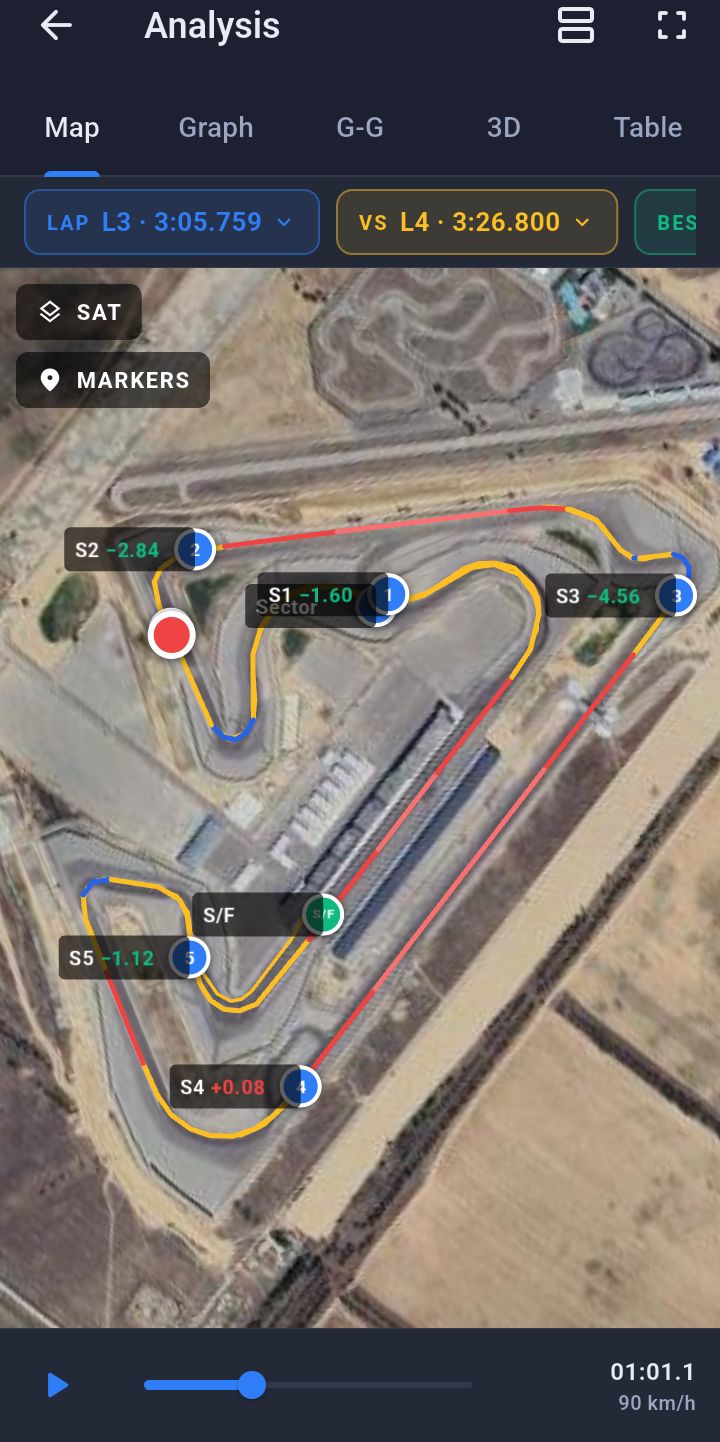
Map with sectors and deltas

Map with sectors and deltas

Satellite map with the lap trace, S1-S5 sector markers and deltas to best. Tap a point on the track — see speed at that meter.

  • Google Satellite / Streets / Esri tile layers
  • Best sectors auto-highlighted
  • Theoretical best lap from your best sectors
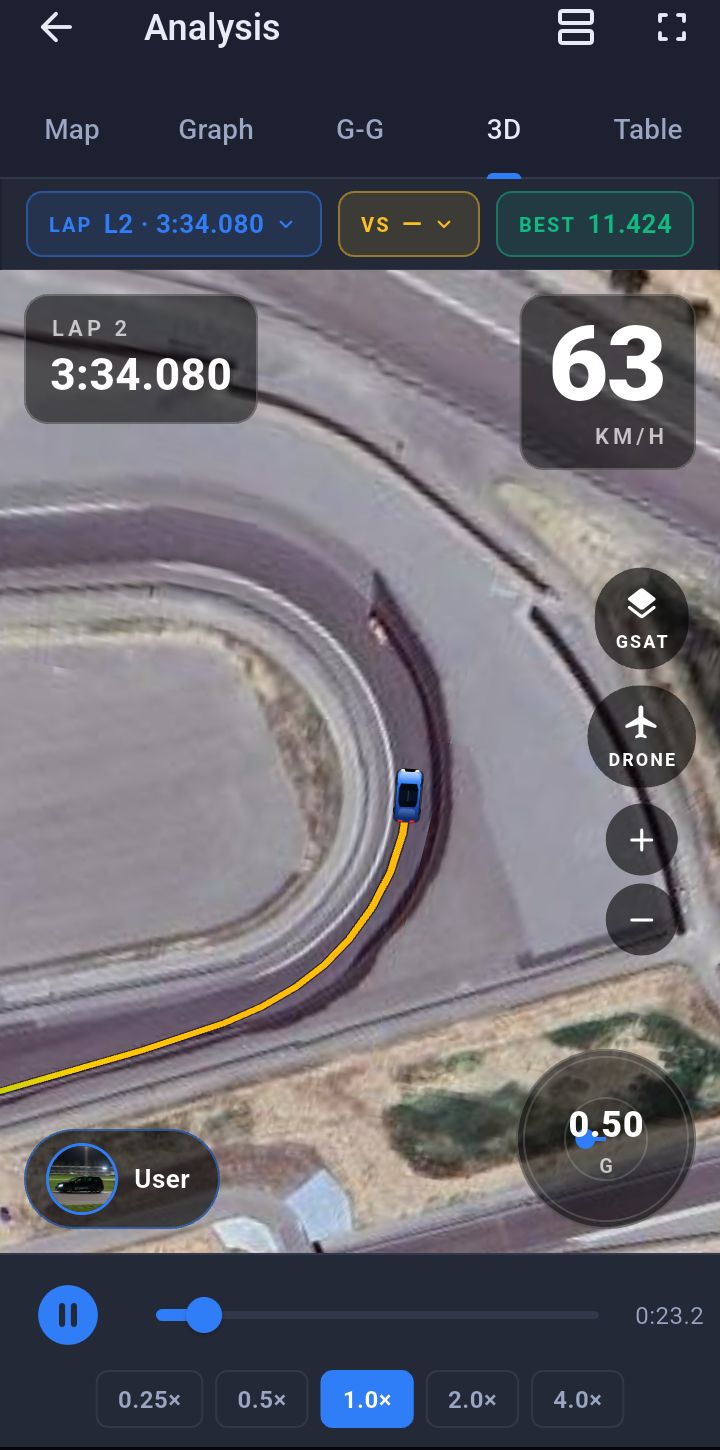
3D Replay with speed-coloured trail

3D Replay with speed-coloured trail

The killer feature. Replay the lap in first, second or third person. Trail colour changes with speed. Cameras: chase / drone / top-down. Playback speed 0.25× — 4×.

  • Satellite track texture — real top-down view
  • Driver car with user photo and avatar
  • Cross-session lap comparison mode
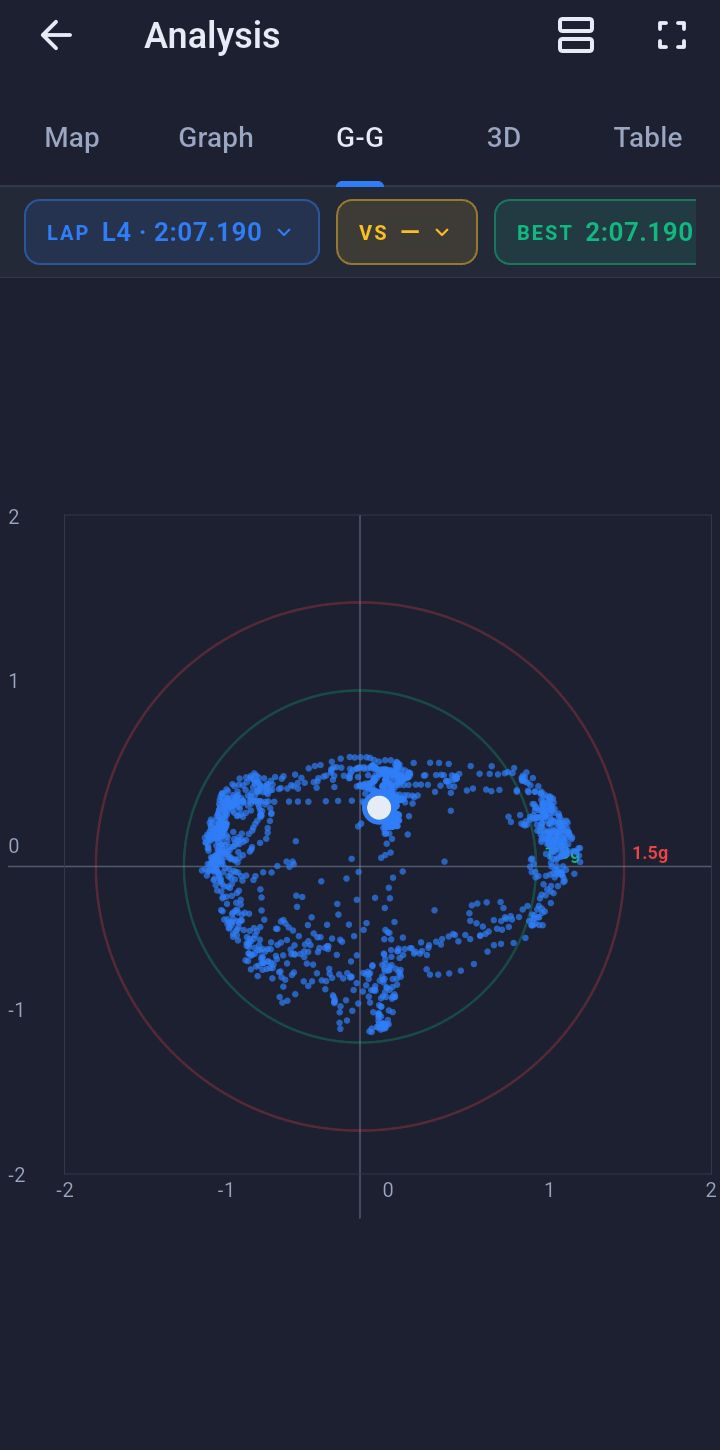
G-G acceleration diagram

G-G acceleration diagram

See where you braked without enough cornering load, and where you left boundary on the table. Each point is a moment, colour is speed.

  • Lat × Long acceleration at real scale
  • Visual hint where you can push further
  • Two-lap overlay
Two-lap compare

Two-lap compare

A semi-transparent "ghost car" rides your best lap alongside the current. Sector-by-sector deltas show green where you won, red where you lost.

  • Ghost car on 3D scene and on the map
  • Delta per sector
  • Import friends' RaceChrono CSV — compare with their laps
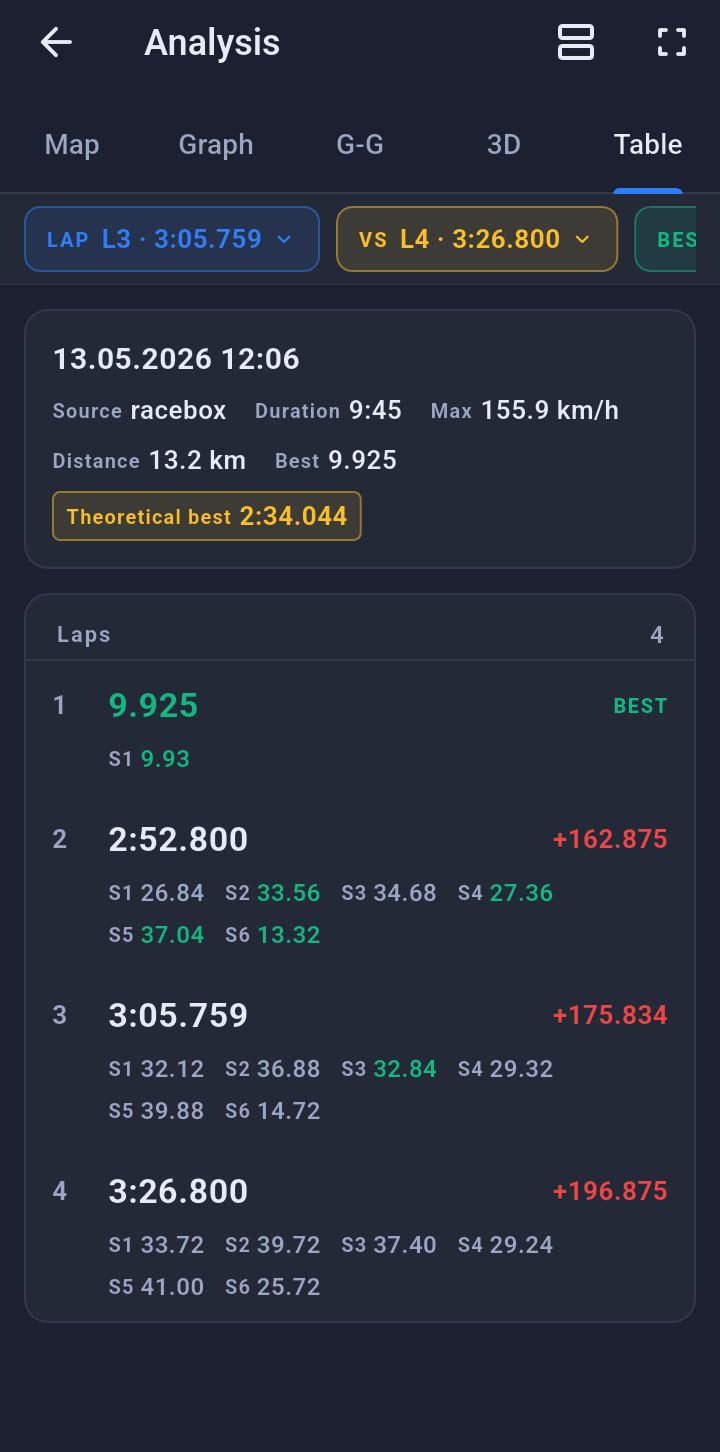
Lap and sector table

Lap and sector table

All laps in the session with times, best lap highlighted, sector deltas — instant view of consistency and where time slipped away.

  • Sort by time, delta, max speed
  • Tap a lap → jump to any other tab
  • Export in popular formats

Phone. RaceBox.

LapVision works out of the box with your phone's built-in GPS, or pairs with professional BLE devices over Bluetooth — no cables.

Free
Phone
Built-in GPS+IMU

Just one phone is enough. Modern smartphones provide 1-5 Hz GPS and a solid IMU — sufficient for track days and understanding where you're losing time.

GPS
1-5 Hz
Setup
0 sec
BLE · Pro
RaceBox
25 Hz GPS BLE

Professional precision. 25 Hz GPS + 100 Hz IMU yields smooth 3D replay and AiM-grade sectors. Battery, satellites, signal — all live.

GPS
25 Hz
IMU
100 Hz

LapVision-CAN — our own OBD adapter. RPM, gear and throttle in sync with GPS. Learn more →

Desktop · Windows

Deep analysis.
On a big screen.

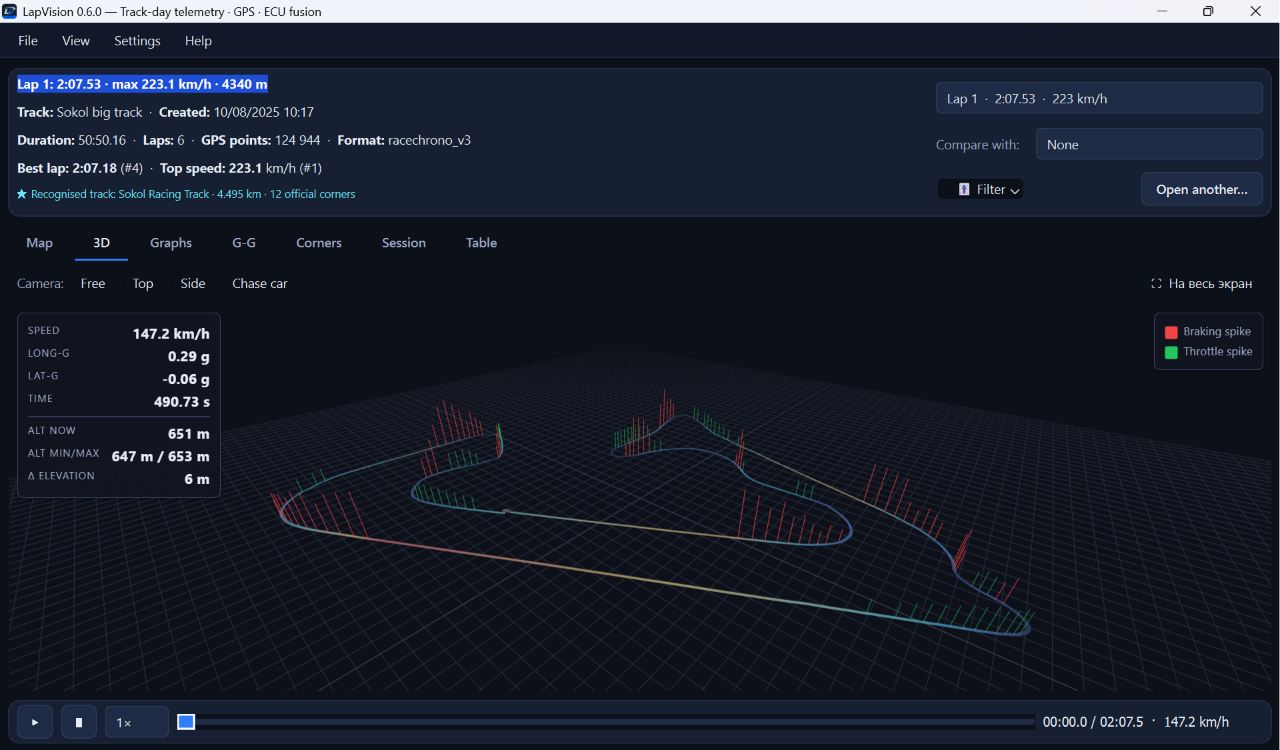
LapVision Desktop brings 7 analysis tabs to Windows: Map, Graph, G-G, Corners, 3D Replay, Session and Table. Import any RaceChrono v3 CSV and see every detail of your session.

  • 7 analysis tabs: Map, Graph, G-G, Corners, 3D, Session, Table
  • Speed-coloured GPS track with sector markers
  • Corner-by-corner advice: carry more speed at T8
  • Free — no subscription, no account
Download for Windows — Free
LapVision 0.6.0 — Track-day telemetry · GPS · ECU fusion
LapVision Desktop 0.6.0
Lap Compare

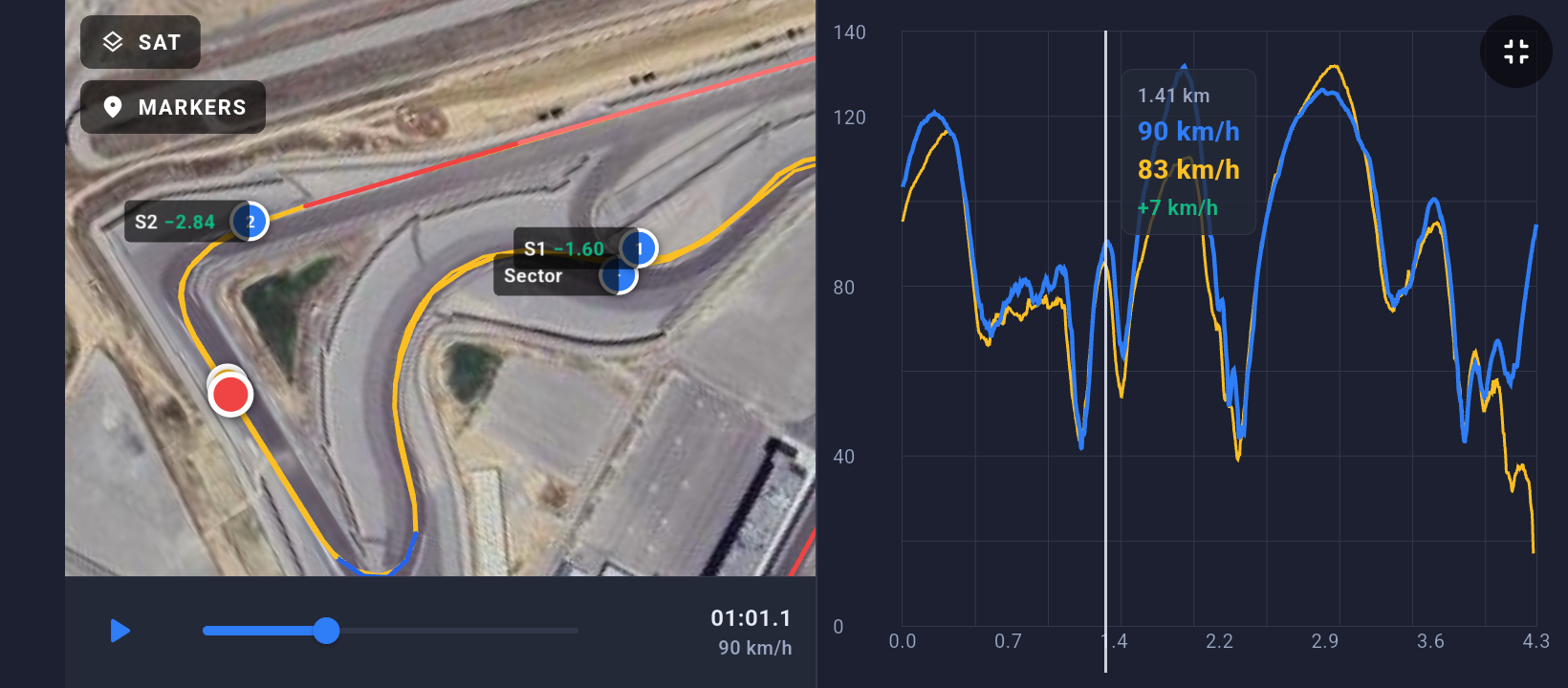
Find the seconds on every sector.

Overlay two laps — yours vs your best or vs a rival. Sector deltas show exactly where you lost or gained time, lap after lap.

  • Sector-by-sector delta (S1–S7)
  • Overlay any two laps from any session
  • Speed graph comparison on the same axis
  • Best theoretical lap calculation
Compare laps
S1 −1.60
S2 −2.84
S3 −4.56
S4 +0.08
S5 −1.12

Everything for the driver. Nothing extra.

Sharp controls, no visual noise. No ads, no subscriptions — your sessions stay local on your device.

Sector setup

Start/finish, Finish, intermediate sectors — unlimited count.

Speed × Distance graph

Classic 'speed by distance' graph with two laps overlaid — where you got on the throttle, where you held back.

Import / Export

Import CSV/VBO. Export back — opens in all popular apps.

Wakelock + auto-brightness

Screen stays awake during recording, brightness adjusts to the sun — your phone doesn't die at the paddock.

Fits any vehicle.

GPS mode works with any car — sedan, sports car, karting or motorcycle. CAN telemetry (coming soon) — initially for VAG MQB/MLB.

Any car
GPS · Free

Lap timing, sectors, 3D replay, G-G — they work without OBD-II, through the phone's GPS or via RaceBox over Bluetooth.

BMWAudiVWPorscheHondaToyotaSubaruNissanKartingDriftDrag+ all others
VAG MQB / MLB
CAN · Pro · Бета

LapVision-CAN — our own OBD adapter. RPM, gear, throttle, temperatures, boost — synchronized with the GPS trace. Launch support for VAG MQB/MLB, more platforms being added.

Audi A3 8V/8YA4 B8/B9A6 C7/C8S3 8VRS3 8VVW Golf 7/8 GTIGolf RTiguanOctavia RS+ more

Pinpoint engine analysis.

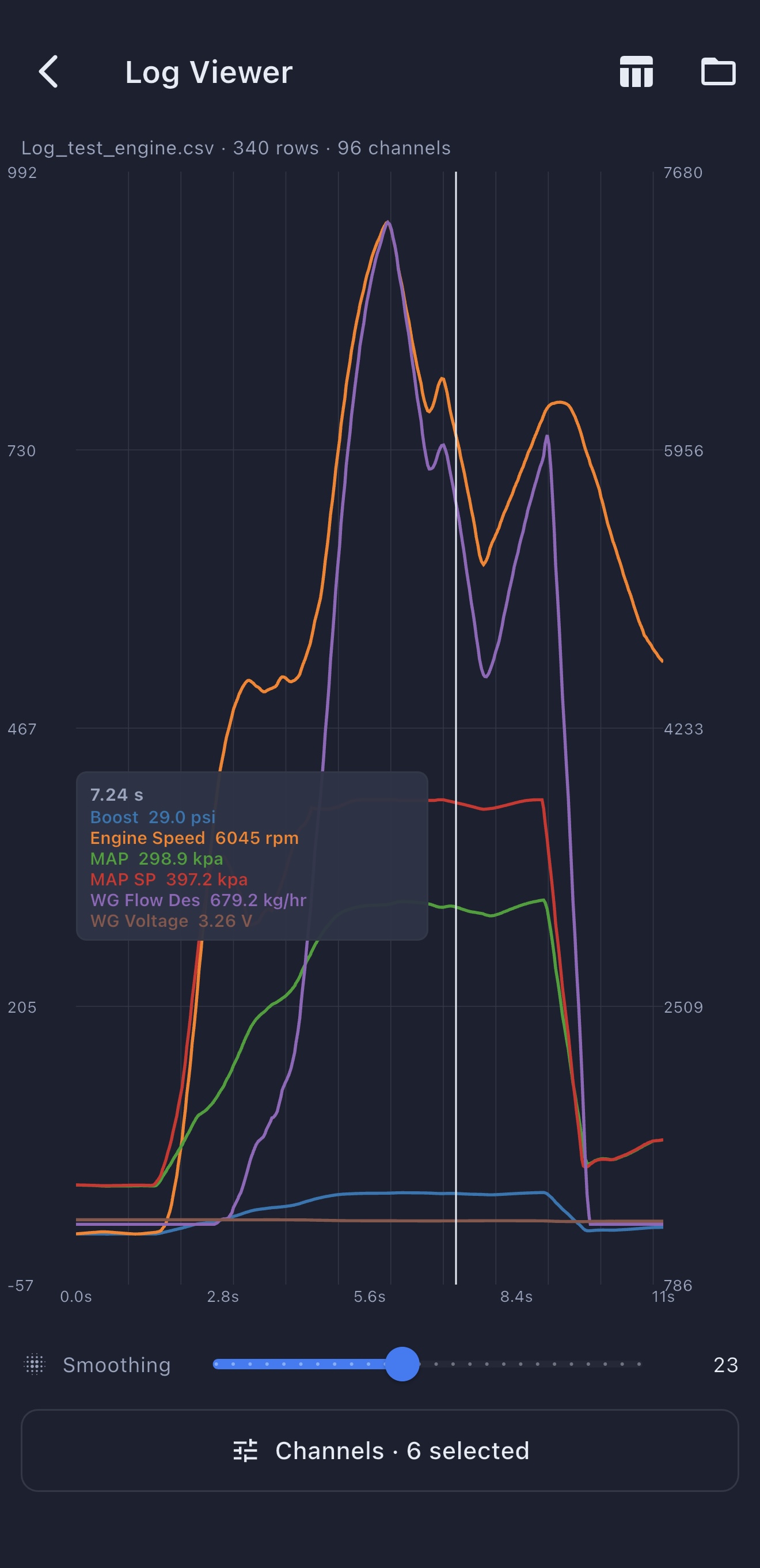
Map painted by your chosen channel, charts locked to track position. Tap anywhere — see exactly what the engine was doing there.

Engine telemetry — 96 CAN channels
Pro · Beta
  • Map painted by your chosen channel
  • Charts synced to position on the track
  • 12 CAN channels standard, up to 80 extended

Access limited to testers. Or reach us in Telegram.

Free
Now
  • GPS lap timing to 0.01 s
  • 3D Replay with speed-coloured trail
  • 5 analysis tabs (Map / 3D / G-G / Compare / Table)
  • Phone, RaceBox
  • RaceChrono v3 import / export
  • Any car · no OBD-II needed
Pro
2026 · Waitlist
  • Everything in Free
  • LapVision-CAN OBD adapter included
  • RPM, gear, throttle, temperatures
  • Turbo boost, lambda, ignition advance
  • Engine channel graphs in sync with GPS
  • Audi · VW · Skoda · SEAT (MQB/MLB)

Download and drive.

App for iOS and Android. Free. No ads. No subscriptions. No account.

App Store / Google Play — in final release stage. Desktop for Windows already works. Follow our Telegram channel — we'll write when mobile launches.

Frequently asked.